-
Getting ready for the M1 Mac mini (#apple #applesilicon #m1macmini #m1chip)
How do you get ready for an M1 Mac mini when you’re a power user of a 2017 21.5" Intel-based iMac? First, I know the M1 Mac mini speed will make the iMac seem slow in comparison. That, I’m ready. I’ll keep my iMac for a while as my gateway to my legacy software and apps for my work. Second, upon the first boot of the Mac mini, I’ll set it up as a brand new machine. No Time Machine restore. I can’t remember the last time I started fresh on a new Mac. I’ll depend on Apple’s iCloud to bring back all my stuff on my 1 TB SSD drive. Then, I’ll meticulously pick which app will make the cut for installation on this shiny and speedy machine. I’m building a list of universal apps I want to install on it, but I’ll also need the help of the excellent website, “Is Apple Silicon Ready?”. Only “Universal” apps will be allowed on it. Even if Rosetta 2 is a technical marvel, I don’t want it to contaminate my Mac. I want the pure M1 Mac experience. Oh, one last thing, if an application’s icon is not good enough, I can search for a better one of places like https://macosicons.com/ and https://www.macosicongallery.com/ or Michael Flarup’s excellent icons pack.
Continue reading → -
Using Twitter Fleet, why not! (#twitter #creativity)
As you know, Twitter came out with « Fleets », its clone of Snapshat’s Stories. People don’t really like it. Or do they? My timeline is constantly filled with my followers posting fleets. I guess some do like them. I decided to give it a serious try. I think they add another dimension to Twitter that I happen to find interesting for highlighting purposes. It’s simple to use, just enough design flexibility. There are is one drawback: they only show up on the iPhone (not the iPad or the web), which I find strange and somewhat arbitrary.
Continue reading → -
Let's meet! Here is a free idea for calendaring app makers (talking to you guys! @macguitar @flexibits)
Let’s play a game. One of your customer calls you and ask for a meeting (virtual or in person). Before answering this request, you have to look at your calendar to see your free/busy time. It’s a time consuming and error prone process. What if your favorite calendaring app could generate a map of your weekly schedule with all sensible information masked out, like in the following example (made with Fantastical). This could be sent as a PDF file to the customer, would save a lot of time. It’s surprising that, to my knowledge, no calendaring app offer this option. I would pay to get this.
Continue reading → -
Oh I love that one from @gruber (#apple #applesilicon #m1chip)
Gruber publishes a piece today about how hard it can be for some people to accept that Apple is yet again did the unthinkable.
This one is simply priceless: “Intel and AMD have learned and struggled for a few years here figuring out how to make decent PC chips. Apple hasn’t just magically figured this out. They’re not going to just walk in.”
It’s a liberal transposition of a famous quote on how Apple, a PC guy, just can’t walk in and make a great phone. With the M1 chip, yes, Apple just walked in and did it. Again.
Continue reading → -
Dear Microsoft... (#microsoft #privacy #privacyprotection #surveillance #office365)
Following this statement from Microsoft, here is one question for you, Microsoft: why haven’t they thought, at the very beginning, that this Office 365 feature wasn’t a good idea to begin with? Here is another question: Who do you think you are to devise a “Microsoft Productivity Score”? “a tool that helps organizations measure and manage the adoption of Microsoft 365” — Microsoft
There is a difference in semantic here: measuring adoption vs measuring productivity score. What is “being productive” anyway? The road to hell is paved with good intentions, as they say.
Continue reading → -
What is holding back the hardware, again? (#apple #iphone #ios)
“…until there are some changes with either iOS, the iPhone or both, bigger isn’t really better. It’s just bigger.” — James Rogers writing for iPad Insight about the iPhone 12 Pro Max. Things like picture-in-picture is a step in the right direction on the iPhone. The situation is obviously better on the iPad, yet there are still many low hanging fruits.
 Continue reading
→
Continue reading
→
-
I'm already afraid (#apple #m1macmini #applesilicon #intel #imac)
Just saw that tweet today. It’s too late. I’ll be installing my new M1 Mac mini along the side of my 2017 iMac. Thwy will be both in direct competition. I’m afraid that I’ll find my beloved iMac too slow. I’m not there yet. I’m still waiting for my new thing to get delivered. I’m getting myself mentally ready for the shock. I’ll have to keep my iMac for a while for my daytime job.
Continue reading → -
About those iOS Apps screenshot on the App Store (#apple #appstore #iosdev)
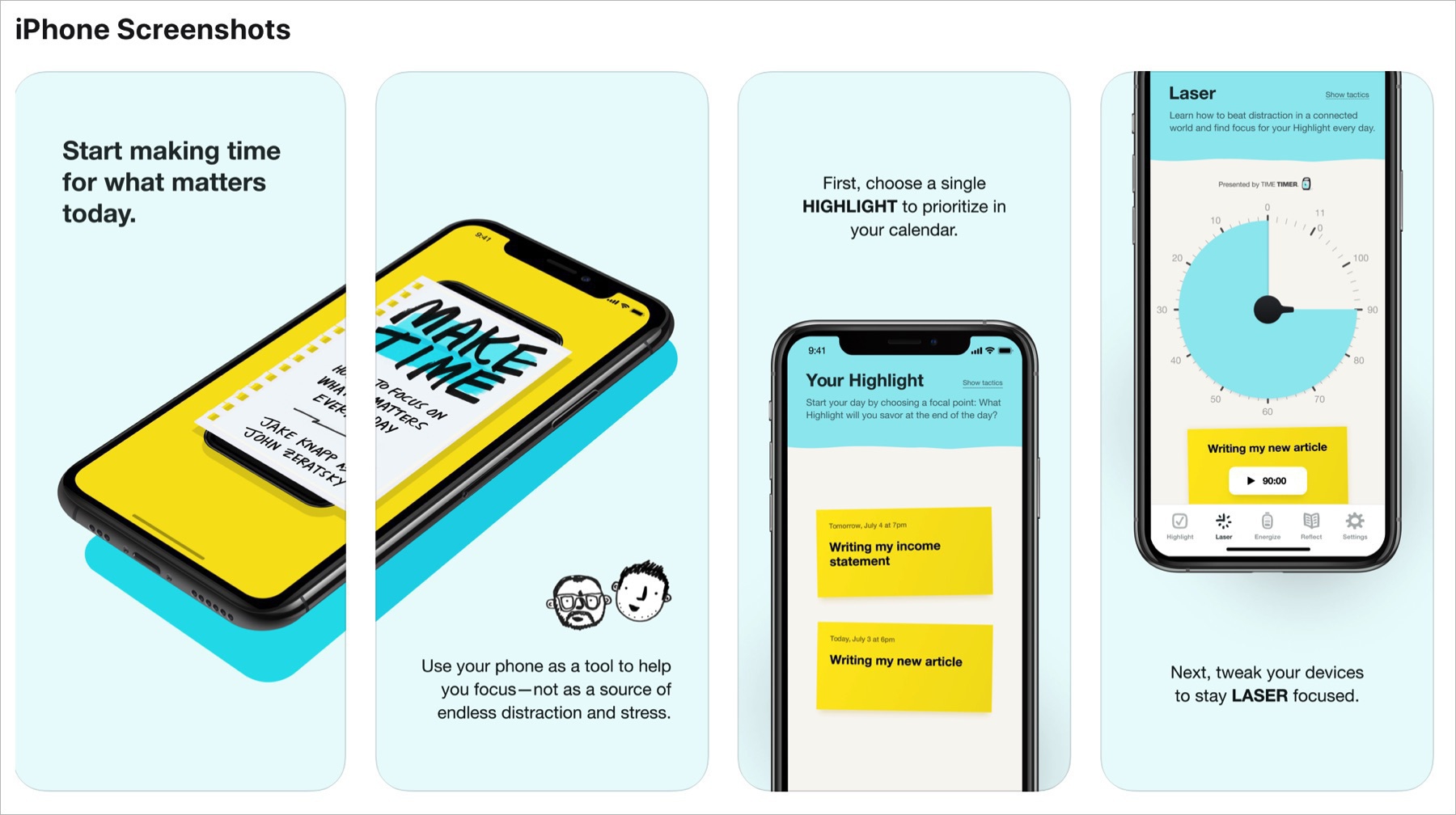
I hate those screenshots montage. They lack emphasis on the application itself, the product. They waste precious space. At the very least, why not put a video showing the application in action. People don’t like to read long application description page. Is it Apple’s fault. Probably. Not sure. Apple is not enforcing their own rules on these screenshots.
This post was triggered by another Matt Birchler post.
 Continue reading
→
Continue reading
→
-
Don’t touch this screen (yet!) (#apple #mac #macos)
Steve Jobs once downplayed flash memory based MP3 players when the iPod was just beginning its ascension. We know what came after the iPod with a small drive. The iPod nano, an MP3 player using flash memory. If you see a stylus, they blew it. The iPad eventually came with support for a stylus… oops, a pencil. What came after that? Support for a mouse with iPadOS 13.4. See the trend? Are you getting it?
Continue reading → -
The Mac mini renaissance? (#apple #applesilicon #m1chip #macmini)
I don’t know if this is because I’m eagerly waiting for mine, I’m in a distortion of reality, but the Mac mini seems on the verge of a major regain of popularity. Sales of the little box are booming in Japan and now AWS is offering an Intel version as an EC2 instance… while waiting for the real deal, a M1-based version. The latter brings renewed interest in a platform a lot of pundits were considering dead a few years ago, thanks to Apple’s apparent lack of interest.
Continue reading → -
Apple’s Reminders is so underrated (#apple #ios #ipados)
How many To Do apps are available on the App Store? A lot. They all have a different take on how we should create, manage and check our To Do. The best one maybe just in front of your eyes, on your iPhone and iPad: Apple’s Reminders. Here is why for me it does the job quite well.
I’ve been using OmniFocus and Things in the past, but after Apple redesigned Reminders in iOS 13, I came back to using it. Besides supporting basic things like URL, images and notes, you can group To Do lists in folders, lists can be shared with others, Shortcuts are supported, it synchronizes seamlessly across my devices.
Continue reading → -
Why getting a Mac Pro can still make sense (#apple #macpro #applesilicon #mac)
In light of all the raving reviews about the M1-based Macs, you might wonder why someone would still need and buy an Intel-based Mac Pro? For many reasons. First, some high-demanding pro software might not be compatible on M1 Macs. Second, if you run software who takes advantage of multiple cores, the Mac Pro with its Xeon processor is hard to beat. Example of this is VMware Fusion. Other use cases demand the most powerful CPU you can get, and they come in the Mac Pro, for now. Third, the Mac Pro is still the most expandable Mac out there. I’m one of those contemplating the Mac Pro for my SDDCbox project, but I must say that my priorities shifted a bit. I’m a few days away from receiving a M1 Mac mini. It will keep me busy until the beginning of 2021.
Continue reading → -
Did Apple just killed the Mac resale value? Oh yes. (#apple #applesilicon #intel #mac)
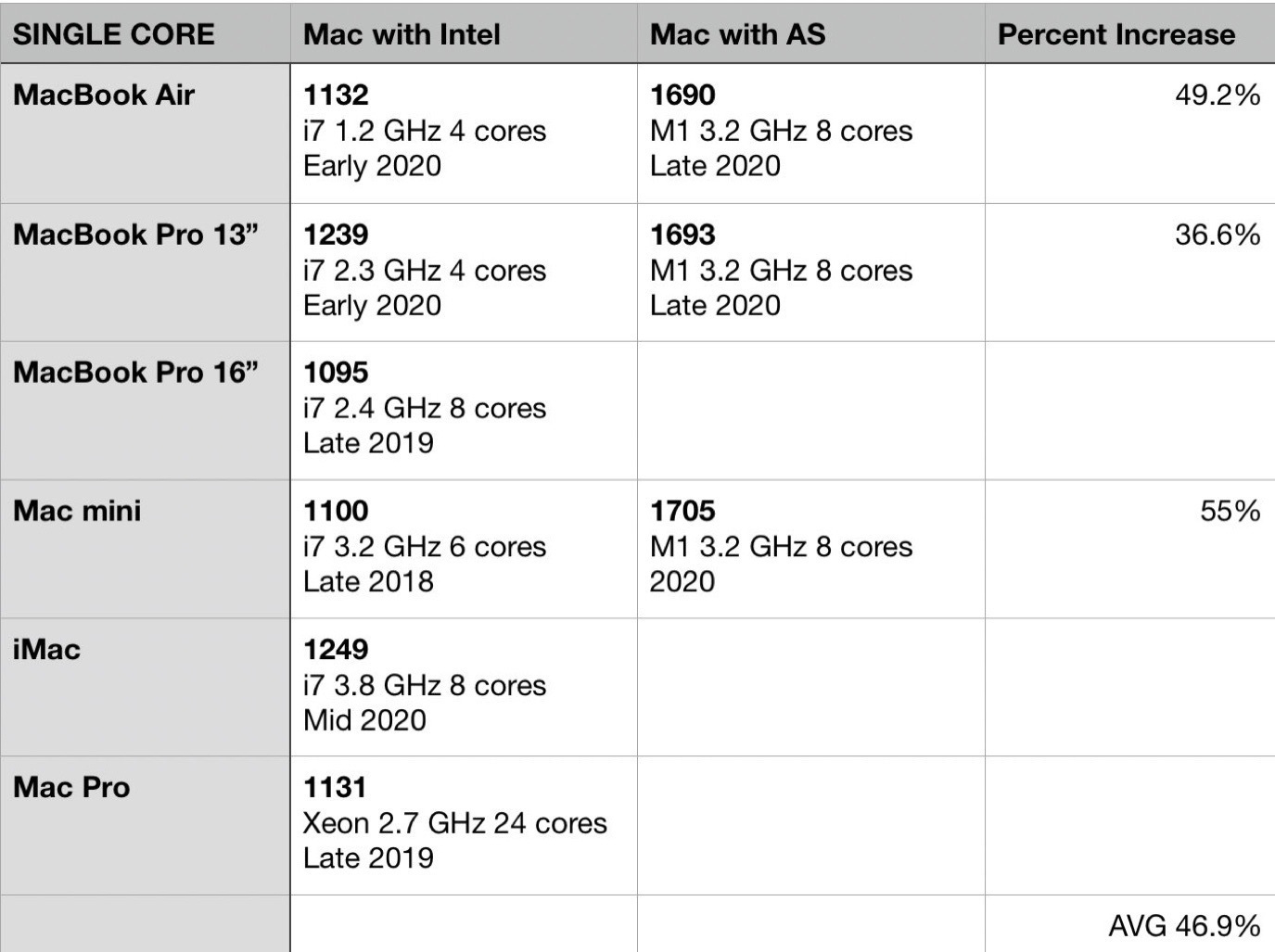
The M1-based Macs ramifications are far reaching as we are still pondering about their impact on the future. Reading this tweet from Parker Ortilani, we have to wonder if Apple, with its M1 chip introduction, just killed the resale value of any Intel-based Macs. Credits: Tables from the author. Simple answer: YES.
Continue reading →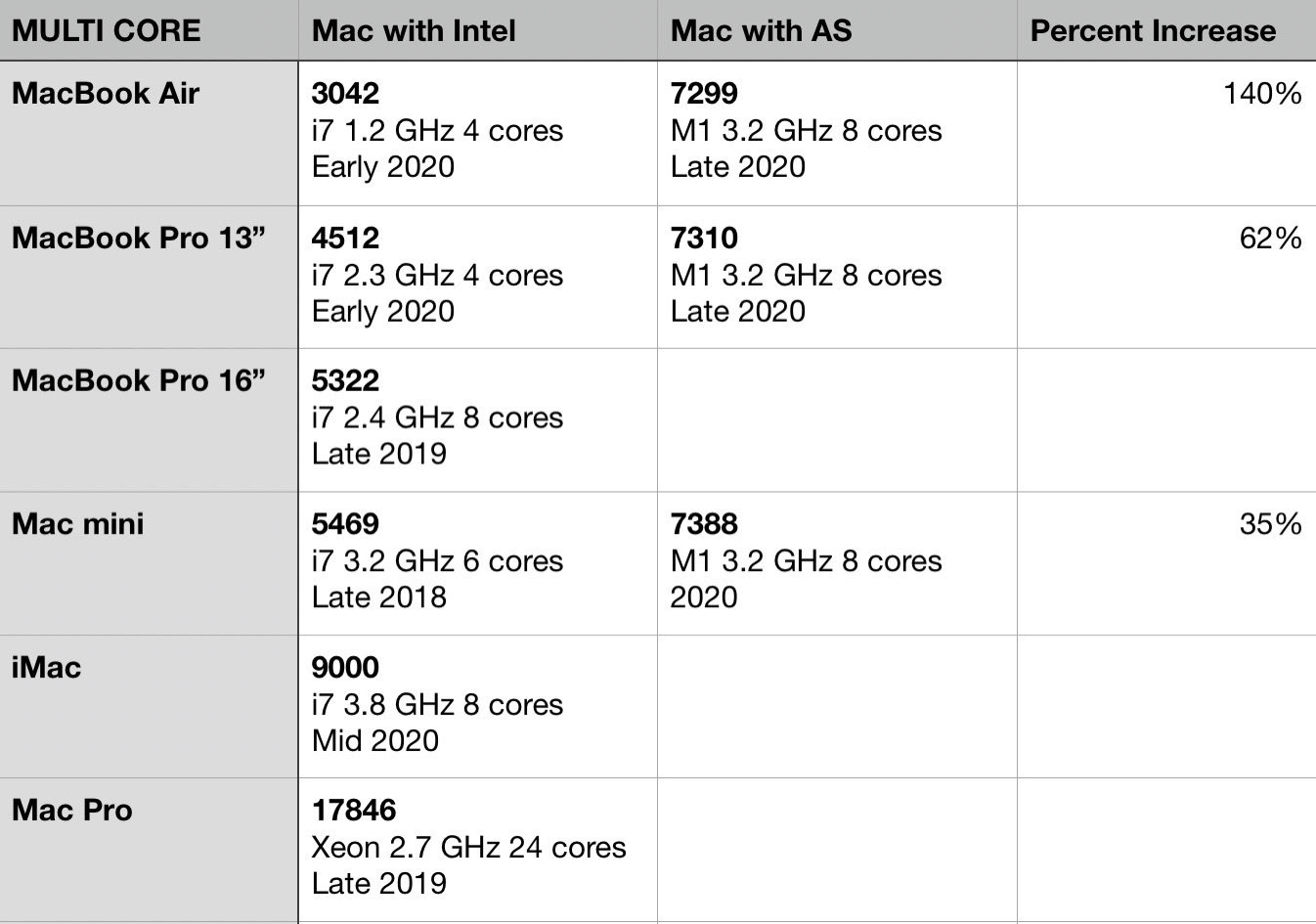
-
AppleOne - Expired or Tired? (#apple #appleone #subscriptions)
My AppleOne signup went weird when it was announced by Apple. I was billed for some of the individual services as well as the bundle. I’ve been looking for credits since then, which are still yet to come. I think it will be a mess to fix unless Apple gets their act together before then. Now, it looks like my subscription has ended and I cannot renew it. Something bad is really happening. I’m not alone feeling the pain, according to MacRumors.
Continue reading → -
Building his ideas and pushing boundaries on the way (#apple #iosdev #developer #designer @jsngr)
A few weeks ago, I wrote about the TestFlight App Store and how cool it was. The guy behind it, Jordan Singer, is also on Substack. I’m already a big fan of his work.
As a former indie iOS developer (2009-2013), I find it interesting to see other people’s ideas, work and initiatives. This guy is on a roll and tests some App Store review process boundaries, which is more than needed these days. I wish him success with Airport.
Continue reading → -
Apple is no longer doomed. Intel is. (#apple #intel #applesilicon)
Who is winning between Apple’s M1 chip and Intel’s Tiger Lake chip? Well, if benchmarks are to be believed, Apple is winning, by a wide margin. The results are pretty worrisome for Intel which seems incapable to go beyond a 10 nm process. Intel will become the emblematic image of inefficient processors for years to come. Dell, HP et al. should be worried too because they are in the exact same position Apple was just before their M1 announcement. The only thing now favouriting the Wintel world is the need for Windows for a vast majority of users.
Continue reading → -
Shortcuts to frustration (#apple #shortcuts #ios #ipados)
Let’s put it straight: Apple’s Shortcuts are the weirdest, most cumbersome and utterly frustrating thing to build, test and eventually use. I cannot count how many hours I spent trying to understand their intricacies and most useful use cases. As much as I want to get empowered by them, it often ends in frustration. Here is why.
You cannot disable old shortcuts that are no longer used but that you want to keep as a reference. There is no way to export them in a clean and readable PDF format. There is a lack of some form of runtime debugging tools. The editor doesn’t scale beyond a few dozens instructions. There is no way to write shortcuts in a text editor à la AppleScript. Share sheets bad design and organization make shortcuts invocation a trial and error experience. As your shortcuts collection grows, it hard to remember which shortcut does what in what context and what is required to launch it. And the list goes on and on. Documentation within the Shortcuts editor is lacking, very limited. A big part of the story is dependant on the willingness of developers to support them. It’s so frustrating to see an app lacking any form of exposure to the shortcut engine.
Continue reading → -
On using Lightroom on a Mac (#apple #adobe #applesilicon)
Let’s set the tone: Adobe software, Lightroom in particular, is not a very efficient piece of software to use on the Mac… even on a higher-end configuration. Recent updates in the last year or so tried to improve things a little bit, but there is still a long way to go. It’s not clear why Lightroom Classic is so bad. Is it because it is a multi-platform software? Probably. If so, we pay the price at every single use.
Continue reading → -
Selling a piece of my Apply history (#apple #imac #2007 #elcapitan)
Today I sold my oldest Mac in the house: a 24 inches 2007 iMac running El Capitan. When I look at this computer, I see many similarities with the current iPad Pro design: round bezels, boxy frame. I hope Apple will return to this design, albeit in a refreshing way, for their upcoming M1-based iMac.
Now, waiting for my M1-based Mac mini. 24 days before adding another piece to my long story with Apple products.
Continue reading → -
A must have utility for Mac: HazeOver. (#apple #mac #utility #minireview)
Just bought a Mac utility: HazeOver! How come I didn’t know about this one?? What is it? It’s a small utility which helps bring better focus to the active application on your Mac. It does this by dimming the out-of-focus application windows. It works with multiple displays. If you prefer to work in Light mode over Apple’s Dark Mode, it will make things a lot easier on your eyes. Think of it as a visual compromise. Makes Big Sur even better. Highly recommended.
Continue reading →