Bye Bye ChatGPT Atlas
Back home. Rebooted my Mac because of an issue with macOS 27 Golden Gate. Got this warning. Oh well, I didn’t use Atlas anyway. I’m not even sure if Atlas is on OpenAI roadmap for the long run.

Back home. Rebooted my Mac because of an issue with macOS 27 Golden Gate. Got this warning. Oh well, I didn’t use Atlas anyway. I’m not even sure if Atlas is on OpenAI roadmap for the long run.
Vacations coming to an end this weekend, expect normal programming resuming by Sunday. It was a great two-week vacation in France but the overwhelming heat wherever we stayed was a challenge that we didn’t expect and was hard at some points to cope with, especially in Paris.
I use Inkwell quite often and I like it. While on vacation, I tend to spend less time reading my RSS feeds so my unread count goes up quite a bit. How do I catch up efficiently? I stop for a small reading session, I switch to Inkwell and use the Today tab but also the Recent tab which is super useful to see what I have missed. In extreme case of disconnection, the Fading tab comes to the rescue. If you’re an RSS feeds junkie, you should consider trying Inkwell.
AI coding is creating a new generation of makers:
it’s been heartening seeing people reverse engineer things and build weird little things that they never would have done before. I guess they’d be scrolling TikTok instead.
Anything to stay away from TikTok is a win for humankind.
My last day in Paris. This week flew by. Despite the climate-related challenges, visiting such a wonderful city has been an unforgettable experience. Now, we’re heading south, on a three-hour TGV ride, for a relaxing week on the seaside. Don’t expect too many check-ins. I’m taking a break. I hoped you enjoyed this photo-centric journaling as much as I enjoyed posting.
Is the Apple TV the new Trash Can Mac Pro? And why on earth do we need a 128 GB configuration? Was it an Apple trick so that people not knowing what they were buying would go the 128 GB route, making Apple smile with 💵💵💵? It’s a shame that Apple keep this around and even increase the price!
I learned of Om Malik’s passing last night when I got back to the apartment through a short message from Manton Reece. What sad news. I had noticed recently that the frequency of his posts had changed and become irregular. He had some health issues and shared a few words about it in the past.
I had been following Om Malik for a few years and appreciated his perspectives on Apple and technology in general. He knew how to read the nuances and contrasts of Apple much better than other bloggers I won’t name here. He was a great tech journalist. Finally, I was a big fan of his photographic style. I had the pleasure of following him on Glass and regularly showed him my appreciation for his unique style, full of nuance. He will be missed by us all.
Om Malik was one year older than me.
I read his last post dozen of times. This feels surreal.
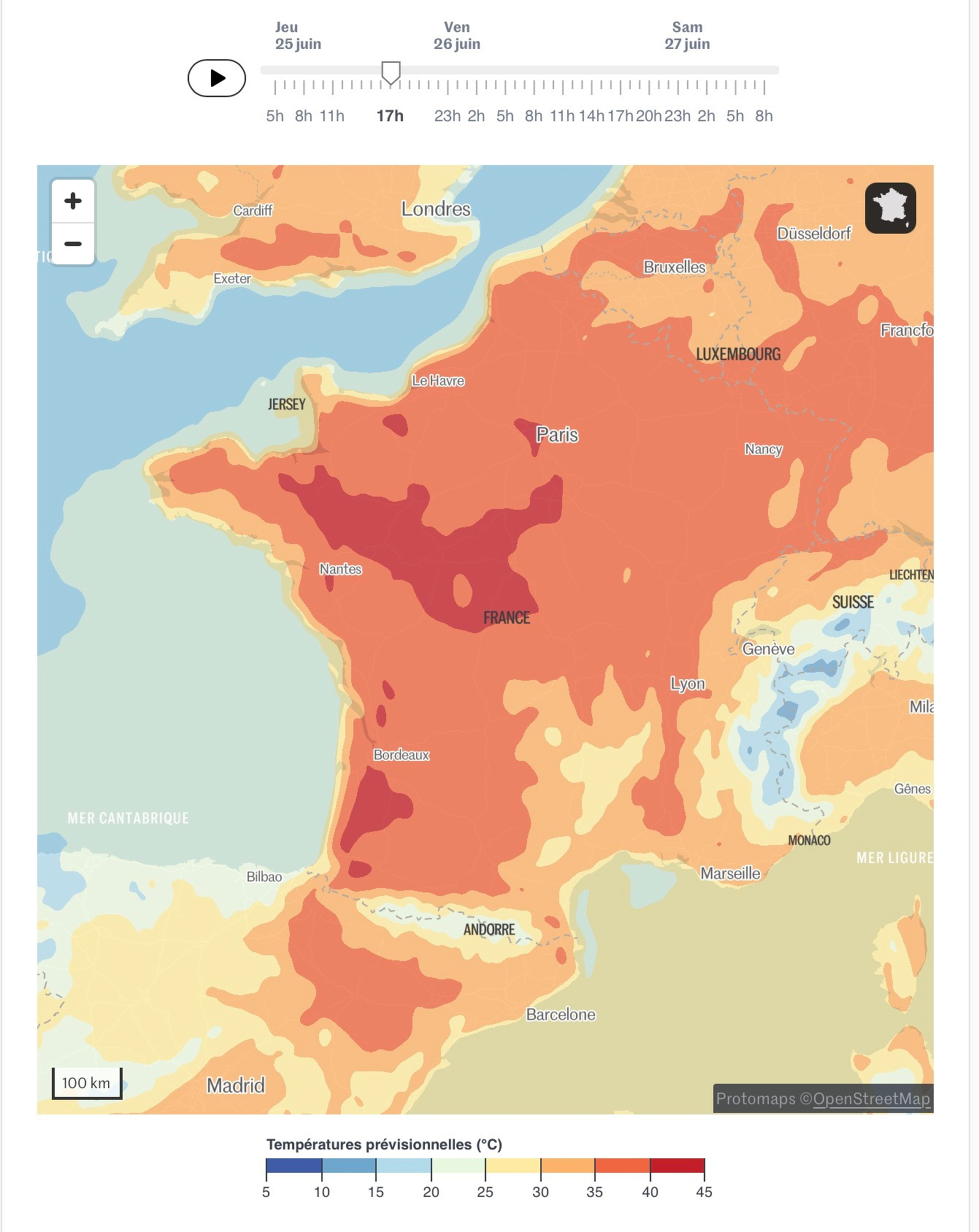
Is the worst of this Paris heatwave behind us? Maybe, as we’re only heading for 37°C today instead of 38°C or 39°C 😒🥵. After three mostly sleepless nights, we decided to leave our apartment a day early to stay in a hotel with AC before leaving Paris for good. Other than that, our plans for the day are still up in the (hot) air.
You might think that, by looking at the trail here, I’m taking a lot of photos in visiting Paris, but that’s not the case. One reason is it’s my second time in Paris, but the second reason is the heat. Sadly, It’s not fun to stop on the street for a few minutes, under the sun, for shooting a few photos. And lastly, my iPhone is overheating quickly while taking pictures! Running a beta version of iOS 27 probably doesn’t help either. 🤦🏻♂️ I’m probably snapping a third of what I would shoot normally.
Starting day #6 in Paris. After a nearly sleepless night with high temperatures in our apartment, no breeze at all, we are facing another record breaking heatwave day. Heading to Notre Dame this morning while outside temperatures are still ok for waiting inline in a queue. Beyond that, we still don’t know. Max temperature is expected to be 38C at 5PM. 🥵🫤😒