I’ve been a weather enthusiast since I was a teenager. At that time, I wanted a weather station (which I got) and manually recorded weather conditions on paper, one page per day with three observations per page (early morning, noon, and before going to bed). It was fun, and I learned a lot in those days. I even met a real meteorologist who was also doing the public radio weather forecast. I was lucky. I still have an interest in weather and climate, but it takes a different form these days.
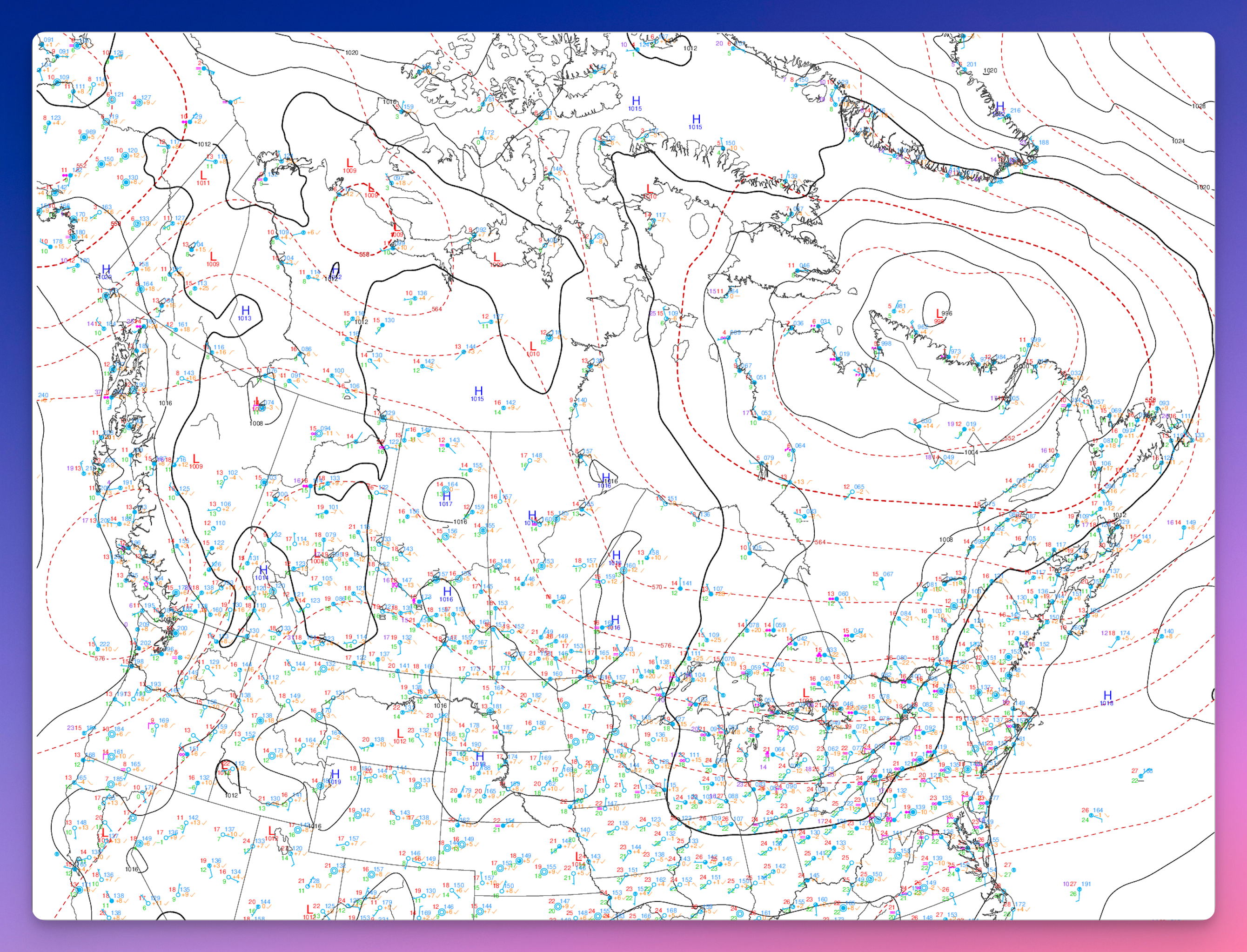
This morning, I wondered if Claude AI could read a surface conditions map. It can. 🤯 I wonder if today’s meteorologists are using AI to summarize weather conditions.
Canada Weather Snapshot — Friday, July 18, 2026
Valid morning of July 18 (08:00 EDT / 12:00 UTC). A single-moment snapshot, not a forecast.
The big picture
A tale of two countries this morning. A deep summer storm system is spinning over northern Quebec and the Hudson Strait, keeping the Far North unsettled and breezy, while most of southern Canada sits under warm, humid, and comparatively quiet air. The sharpest weather is well to the north; the population belt along the U.S. border is having a mild, muggy summer day.
Region by region
Northern Quebec, Nunavik & Labrador
This is the active zone. A strong low is churning over the region, so expect gusty winds, unsettled skies, and periods of cloud and showers, especially around Ungava Bay and the Hudson Strait. Conditions ease the further south you go.
Southern Quebec & the St. Lawrence Valley
Warm and humid, with a gentle flow of muggy air moving up from the south. Comfortable-to-sticky temperatures and a fair amount of moisture in the air — a typical mid-July feel. Nothing severe on the map here.
Atlantic Canada
Sitting under the influence of a broad ridge of high pressure anchored over the Atlantic and Greenland. That generally means more settled conditions in the east, with the ridge acting as a bit of a wall that keeps systems moving off the continent from barrelling straight through.
The Prairies & Western Interior
A few weak, shallow low-pressure areas are scattered across the Prairies and interior west. These are minor and disorganized — think passing clouds and the odd shower rather than any organized storm. Broadly unremarkable.
British Columbia & the Pacific Coast
Under a mix of weak systems along the coast, with generally mild conditions. No dominant storm feature — a quiet Pacific setup for the day.
The North (Arctic & territories)
Cold air remains locked over the high Arctic, as you’d expect, with the northern Quebec storm being the standout feature. The rest of the territories are relatively calm.
Bottom line
If you’re in southern Canada, it’s a warm, humid, low-drama summer day. If you’re in northern Quebec, Nunavik, or Labrador, keep an eye on the wind and showers from that storm parked overhead. The east is settled thanks to Atlantic high pressure, and the west and Prairies are quiet with only minor disturbances.