Apple used to fight for their lives, but now they barely have to work to make insane amounts of money.
Oversimplifying statement.
Apple used to fight for their lives, but now they barely have to work to make insane amounts of money.
Oversimplifying statement.
At some point Apple should ask who is in better need of that money. I know they won’t, but I’d like to think we live in a world where they could. They don’t need more money. They don’t even need the money they have
Capitalism 101: Ask the shareholders.
Apple was a better company when they were an underdog.
Me too, but are we being a bit nostalic here?
Recently some people complained about Apple’s latest ad in the « The Underdogs » series to be offensive, and Apple « promptly » said sorry and removed the ad.
If only Apple showed a similar attitude towards developers who are more than fed up with their App Store practices and voiced their complaints so many times in so many ways… many people are noticing and find this shit show exhausting and damaging.
@mcelhearn @davemark Related:
"We live in capitalism. Its power seems inescapable. So did the divine right of kings. Any human power can be resisted and changed by human beings. Resistance and change often begin in art, and very often in our art, the art of words.” - Ursula K. LeGuin
I still believe in this. We can (and should) make Apple change course.
Rumors suggest a “finally” moment, with Apple on the verge of completing the redesign of the newest generation of the Mac mini, this time featuring an M4 chip. This could result in the smallest Mac ever.
The current Mac mini design dates back to 2010, when Apple was still using more power-hungry and larger Intel chips. The only change over the years has been the back portion to accommodate a variety of port offerings. When Apple transitioned to Apple Silicon chips, right after the Apple Silicon Dev Kit was made available, I expected a redesign and saw the Dev Kit as a transitional step, simply because the chip is smaller, more power-efficient, and requires much less cooling. To me, this was the right time to do so. However, they did not.
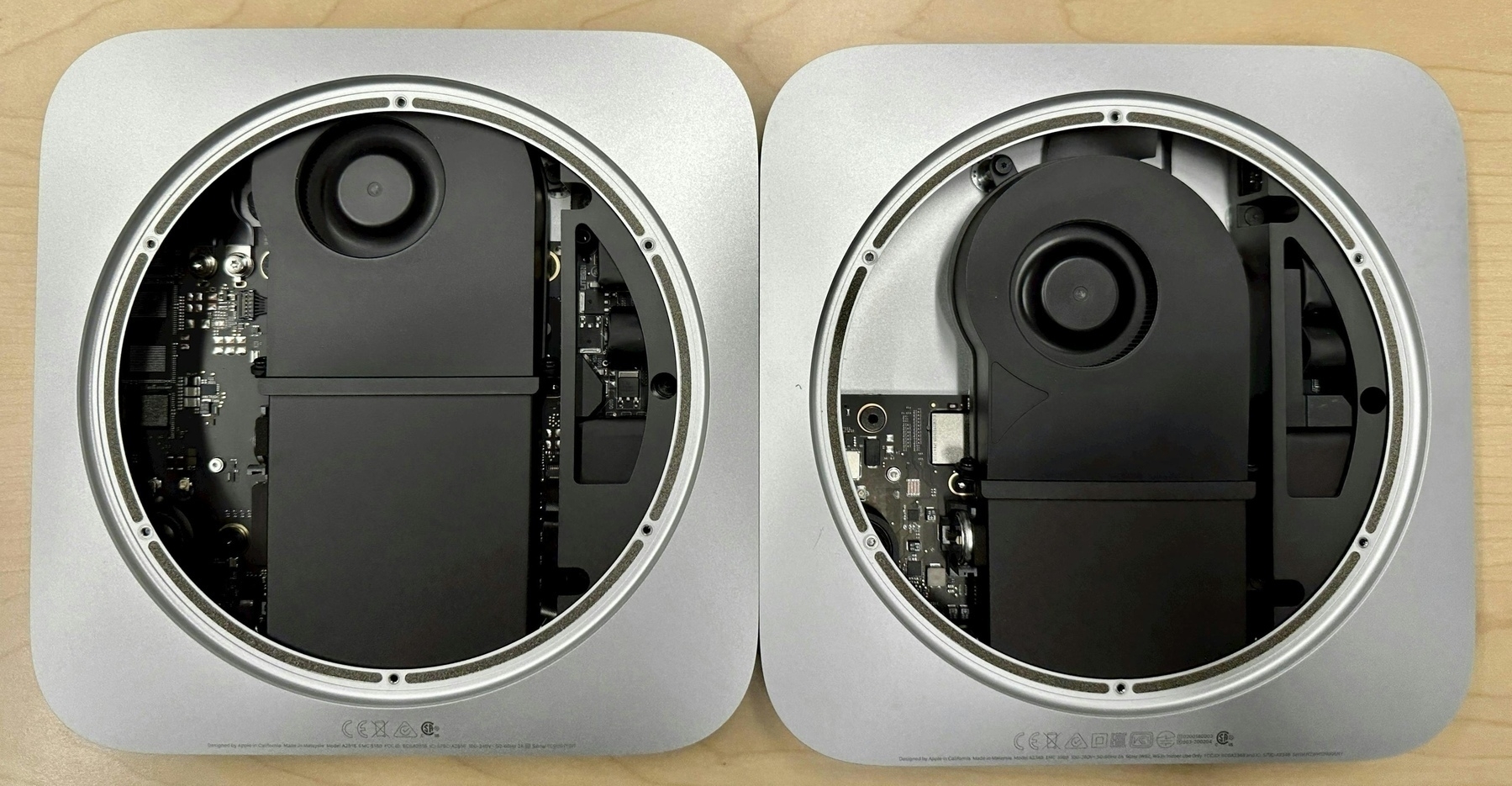
If you look inside an M1 Mac mini, thanks to this teardown guide from iFixit you can see that there is some empty space. Coupled with what Apple can do with the M4 iPad Pro, and the environmental pressure to be more efficient in resource consumption (power, materials, etc.), it is clear that the Mac mini must be rethought from the ground up. Will Apple go with an external PSU for this? I don’t expect this to be the case.
One more thing: I’ve been a satisfied user of the M1 Mac mini since 2020, but I’m increasingly considering an upgrade, either to the Mac Studio or a more powerful Mac mini. I’ll be sure to pay close attention to my options.
What the “can’t do real work on an iPad” narrative is really about
people like me do want a Mac for getting all of our stuff done, but Apple doesn’t make exactly the Mac we want, so we lust after the iPad and lament how it doesn’t get the job done for us. If the Mac we wanted existed, we’d buy that and not have nearly as much to say about iPadOS.
I think Matt is nailing it. Apple doesn’t want to make an iPad run macOS, fine, but are they as much vocal against making a Mac touch-friendly? I don’t think so. Mike Gurman wrote this past week-end that one Mac will see a major redesign in the next 12 months. Could this be to introduce touch support?
Cookie banners show everything that’s wrong with the EU
It makes it hard to cheer for even much-needed antitrust action, like the Digital Markets Act. Because if the EU can screw up something as basic as cookie banners this bad, and prove so incapable and uninterested in re-calibrating its approach, what hope is there for the thornier issues?
A shit show in the making.
Next Apple Watch SE Could Be Made From Plastic
Apple used to sell a plastic iPhone 5c, for example, and it came in vibrant blue, yellow, pink, and green colors. Plastic would also better differentiate the Apple Watch SE from the standard Apple Watch models as the current Apple Watch SE is basically a modified version of the aluminum Apple Watch without the latest features.
I wonder if Apple could use 3D printing for the SE plastic case. There are rumors that Apple might use 3D printing in building devices. That could be it.
I always enjoy MKBHD’s videos, and this one about the Microsoft Surface ARM laptop is no exception. His views are well-balanced and feel honest. Now, about this specific lap, supposedly being fast with long battery life, great built quality and… a touch screen, certainly feels like a leap beyond Apple’s offerings, but… it’s running Windows. And that, is the problem. I wouldn’t buy one of these for the simple reason that running Windows required running a bunch of security-related software to keep it secure. How much processing power these apps takes out of the base configuration? Certainly a few percentage points, but for me, it’s ruining the whole thing. And that, MKBHD don’t mention anything about it.