And Now Microblog Poster Web App is Live!
It’s a web app (on Vercel) just for me to use so that I can write blog posts on the go with a clean UI. It’s my second web app on Vercel built entirely with Claude AI.
It’s a web app (on Vercel) just for me to use so that I can write blog posts on the go with a clean UI. It’s my second web app on Vercel built entirely with Claude AI.
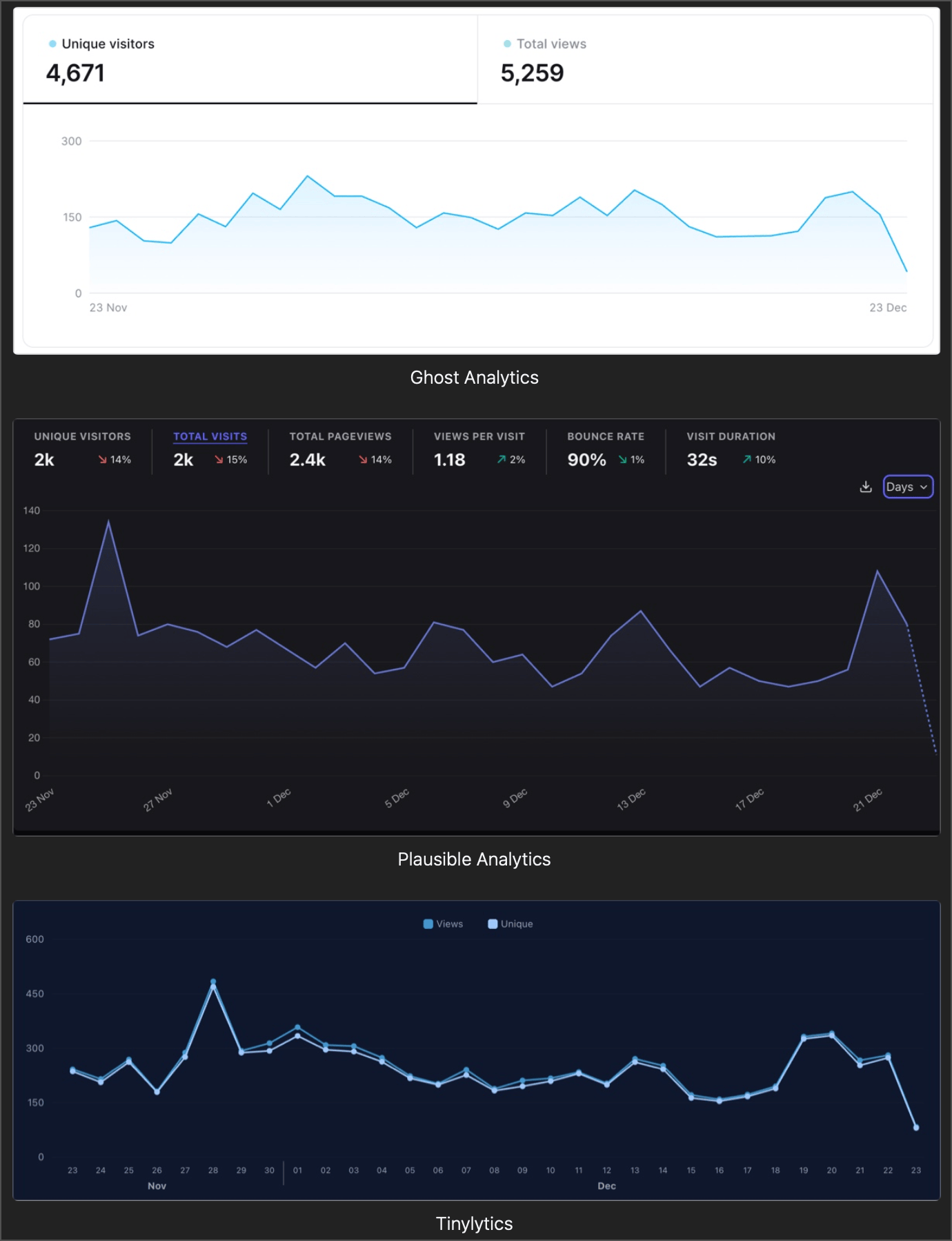
Apparently, web analytics is not an exact science. Here are three web analytics versions of the same period: from November 23rd to December 23rd (Top: Ghost Analytics, Middle: Plausible Analytics, and Bottom: Tinylytics). Plausible feels conservative, with about half as many unique visitors as Ghost, while Tinylytics seems to overestimate. The patterns are barely the same, too. Who’s right?
While experimenting with n8n and LLM services, I realize that using artificial intelligence can become a very costly hobby. The fact that the consumption of these services relies on two separate offerings — the subscription to the interactive service and on-demand billing for APIs — requires careful management and wise choices of providers.
Currently, I use ChatGPT and Claude AI in interactive mode, but I also need a provider to access AI via APIs. This latter mode of consumption is particularly expensive if you’re not careful.
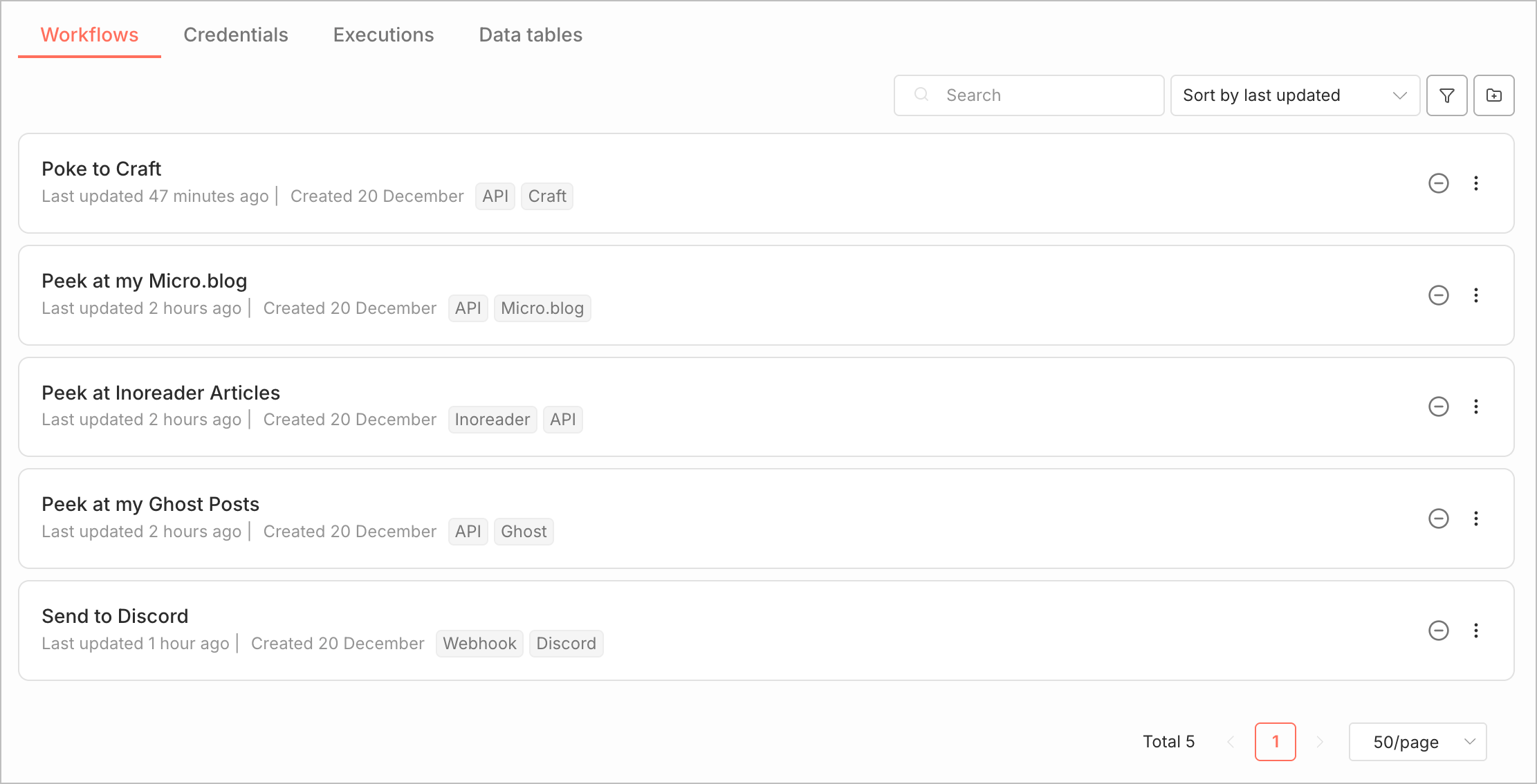
Still exploring n8n, slowly but systematically. Because I’ll be using all sorts of external services like Craft, Micro.blog, Ghost, Inoreader, my strategy is to do individual integration tests instead of trying to build a biggy workflow and find all sorts of errors. Each of these micro experiments is forming the building blocks of something bigger. This approach is not different from the one I used for building iPhone apps and learning Objective-C and Interface Builder back in the day. I guess I’m a bottom-up kind of guy when it comes to understanding this kind of stuff.
It was a memorable, long journey. I officially shut down my IFTTT account tonight after over five years of use. It wasn’t costly, but I have the feeling that IFTTT started to trail behind competitive offerings like Zapier, Make and now n8n. It wasn’t the most user-friendly for debugging issues. Now, I’m turning my focus towards n8n. In the coming days and weeks, it will be my next digital playground for experimentation.
Between 2009 and 2013, in my spare time, I was an independent developer and had three applications in the App Store. I learned on the job, as they say, and it was an adventure that required a great deal of personal investment. I learned a lot, but it was arduous. Learning a new programming language (Objective-C), APIs, and a development lifecycle to make applications available for sale in a store like the App Store was a major challenge. At the time, to deal with problems, there was no artificial intelligence. Everything relied on Google searches and countless visits to Stack Overflow to find solutions.
Today, I have another project focused on automation with n8n, hosting an instance in the cloud, and consuming APIs and artificial intelligence services to build highly customized workflows. There are many things I don’t know, but knowing that I will be able to rely on artificial intelligence to help solve my learning challenges is very reassuring. Without these possibilities, I probably would not move forward with this project.
Realmac Software shared their latest dev talk video. The video title mentions conversations about future plans for Elements. I was curious because I want to know where they are going with the CMS and RSS. I headed to YouTube and asked AI the following question: did they mention CMS? In a few seconds, I got my answer: yes, and they also talked about better support for RSS, which is something I’ve been waiting for. I didn’t watch the video; I already had the information I wanted. I saved 50 minutes of my time.
Now, one question: how is this good for Google? We’re so accustomed to being manipulated by platforms designed to increase our engagement with them; with this AI feature, it’s the opposite—I’m less engaged. Is this another subversive move by Google, part of a master plan that escapes my awareness?
Parker Ortolani on taking a chance of Tony Fadell to replace Tim Cook. At first, Tony Fadell seems like the obvious candidate, but I worry that we may be under the spell of a certain nostalgia in thinking he would be the perfect choice, as Parker points out. The world is no longer what it was in the days of Steve Jobs and his close collaborators. Apple is no longer what it once was either, and that is partly what many people criticize the company for. John Ternus is a product engineer, not a designer, and putting design back at the center of the process as it was in the Steve Jobs era may be a more restorative idea—and in that sense, yes, perhaps Fadell would be a good choice.
I understand the enthusiasm for AI among certain groups of workers, especially in the field of information technology and more specifically software development. However, I believe that caution is necessary for most other categories of employment. Enthusiasm cannot simply be transferred systematically and literally to every domain, whether technological or not. Contexts differ greatly, professions are highly diverse, and even small variations in requirements can reduce the applicability of AI to nearly zero. We should remain critical of this overflow of passion and the promised revolution; by doing so, we might help avoid the potential bubble that increasingly seems to be forming right under our noses.
The piece) from Disassociated about being “freed from personal websites” thanks to algorithms and timelines really resonated with me. I’ve long believed that platforms are killing the web; they are not the web.
I recently asked my son if he had ever considered having his own personal website—a blog, having a place outside the usual platforms. His immediate response was, “But what about discoverability?” Why I think that everything comes down to that: It’s always about beating the algorithms (hello SEO) so that we are “discovered”. I always believed about my own existence without the need of any algorithm. Same with my wife: she knows about my websites but rarely visit them. She’s always talking about discoverability too, thinking that there is no future if I’m not one those platforms. She couldn’t be more wrong. And yet… Platforms have obscured the open web, plain and simple.
This led me to a question that keeps circling in my mind: if we go back 50 years, how accurately did newspapers reflect reality? And how different is our situation today? Yes, the speed and reach of information are radically different now, but consider people who read only one newspaper—like my father did when I was young. Weren’t they also shaped, if not manipulated, by that publication’s editorial line?
Disclaimer: I feel my feelings are well reflected in those few words… it’s complicated.